 |
 |
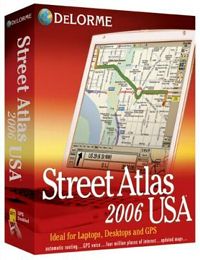
Street Atlas USA® 2006
Extensive road updates…Automatic Routing…GPS Voice…4
million places of interest…
Your source for the most up-to-date street, road and
along-the-way detail available. Use it to plan the
perfect trip on your desktop, then take it on the road
with your laptop and GPS for flawless, worry-free
navigation. The long-time leader in innovation, now
with a wealth of new features.
DISCOVER THE MOST UP-TO-DATE STREET AND ROAD DETAIL
DeLorme cartographers are constantly updating the maps
using a variety of trend-setting techniques, including
new GPS mapping and aerial imagery methods developed
at DeLorme. In Street Atlas USA 2006, you’ll find
268,000 additional roads, with particular emphasis on
populous and fast-growing areas across the U.S. Street
Atlas USA 2006 provides detailed street maps with
address-to-address routing for the entire U.S., from
complex urban areas to less traveled rural parts of
the country. It also provides highway-level maps of
Canada to allow trip planning between the U.S. and
Canada. |
FIND 4 MILLION PLACES OF INTEREST: THE MOST
COMPLETE SELECTION AVAILABLE
You can find everything imaginable while traveling, from
the many expected items to many more not commonly found.
Locate POIs by name and/or category, including
restaurants, lodgings, and gas stations...as well as Wal-Marts,
Starbucks, post offices, fire stations, hospitals—the
most complete and useful selection available.
For Street Atlas USA 2006, DeLorme contacted over 90
nationwide chains for GPS-accurate place-ment of their
individual locations. So, they’ll be right where you
expect them to be!
EASY-TO-READ DISPLAY KEEPS THE FOCUS ON THE MAP
Street Atlas USA 2006 has been designed to keep the
focus on the map, avoiding the cluttering created with
multiple overlapping windows.
The new top-of-the-screen EZ-Nav Toolbar makes it a snap
to create routes quickly and easily. Use it to open and
save map files, create address-to-address routes, share
maps via the Web, and establish custom keyboard
shortcuts, map display, and GPS settings. It couldn’t be
easier.
PLAN WORRY-FREE TRIPS WITH FAST, FLAWLESS ROUTING
The software determines the quickest or shortest route
and provides easy-to-read text directions showing total
mileage and drive times. It can also calculate your
end-of-day stops and fuel stops, as well as fuel costs.
Don’t like the route suggested? Simply add Vias to the
road segments you prefer and the software automatically
recalculates and updates your driving directions. Or,
use the draw tools to block out areas you want to
avoid…for example, the inside of an urban beltway.
You can even add your own routable local roads in rapid
growth areas to keep your maps current.
THE PERFECT TOOL FOR LAPTOPS AND DESKTOP PCs
Laptops: Load it on your hard drive and always
have the maps you need while traveling; plan routes from
your hotel to appointments and other stops; create
address-to-address routes and find more than 4 million
places of interest—it’s like having your own local
expert with you in unfamiliar places; expandable user
interface tabs make it easier to type routes and find
places of interest using large fonts — ideal for
high-resolution laptop screens.
Desktops: Add custom notes and other symbols with
powerful Draw tools; measure areas in square feet and
acres, great for selling property; create your own
perfected maps and post them for family and friends
using the new MapShare™ Publish-to-Web feature. Also
submit map revisions; print detailed maps, travel plans,
and Turn-Detail mini-maps.
THE MOST COMPLETE GPS FUNCTIONALITY AVAILABLE
-
Connect to the USB port of a laptop PC using the
Earthmate GPS (available separately for under $100) and
track your position in real time.
-
Hear turn-by-turn directions and also issue spoken
commands and receive replies to common travel questions
-
Use the high-contrast map color setting to reduce
in-vehicle glare
-
Locate the nearest gas stations, hotels, restaurants,
shopping, hospitals, schools, and much more from your
GPS position with GPS radar search
-
Automatically recalculate your route when you stray off
course, now with new controls for setting off-route
distances
PRINT UPDATED MAPS AND TRAVEL PLANS
Print detailed maps, directions, and Travel Plans. Don’t
want to waste a lot of paper? Then simply print the Turn
Details, which show only the upcoming decision points
along your way.
Don't pay retail prices! Contact us before you purchase.
|